
Activate your Horizon Algo license in a few steps.
Every purchase is a lifetime license, set up personally after checkout. Follow the instructions for your trading platform below.
NinjaTrader algos
Your NinjaTrader license is linked to your NinjaTrader platform account. During checkout, enter the exact email address you use to sign in to NinjaTrader Desktop.
- Make sure you are using NinjaTrader Desktop 8.1.5.0 or newer.
- Sign in to NinjaTrader Desktop with the same email address you entered during checkout.
- Download your purchase and import the supplied strategy ZIP into NinjaTrader Desktop.
- Processing can take up to 24 h. Once confirmed, restart NinjaTrader once and enable the strategy.
No hardware identifier or separate licensing key is required. Your broker account, data feed, simulation account and computer do not change the license. On a new computer, sign in with the same licensed NinjaTrader account and import the strategy again.
Explore NinjaTrader strategies →MetaTrader 5 EAs
During checkout, enter your preferred license email. After your purchase, download the ZIP with the MQL5 program and Readme, then:
- Email info@horizon-algo.com with up to five MT5 account numbers and their matching server names.
- In MT5 → Options → Expert Advisors, enable “Allow WebRequest for listed URL” and add the validation URL below.
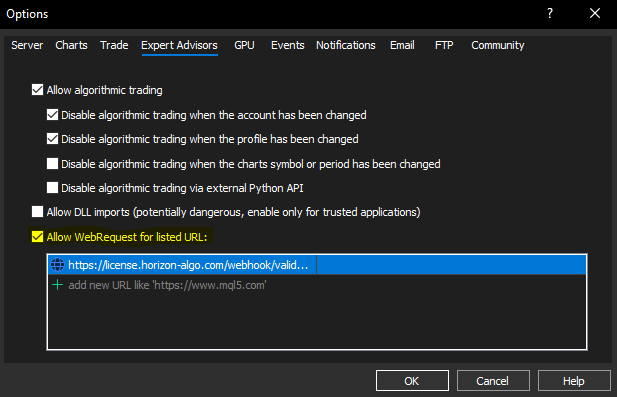
We activate each account/server combination and confirm by email. MT5 EAs aren't hardware-locked, so reinstall freely on a new machine.
Explore MetaTrader Expert Advisors →Need help with activation?
Review the FAQ or contact Horizon Algo support with your product and platform details.